Cross-Hierarchy Tours (Multi-Host)
Dialogs, ModalBottomSheets, and Popups render in a separate composition tree from your screen. A single WaypointHost can only reach targets in its own tree, so targets inside a modal are invisible to the host. WaypointOverlayHost solves this by letting a secondary host live inside the modal and share state with the primary host.
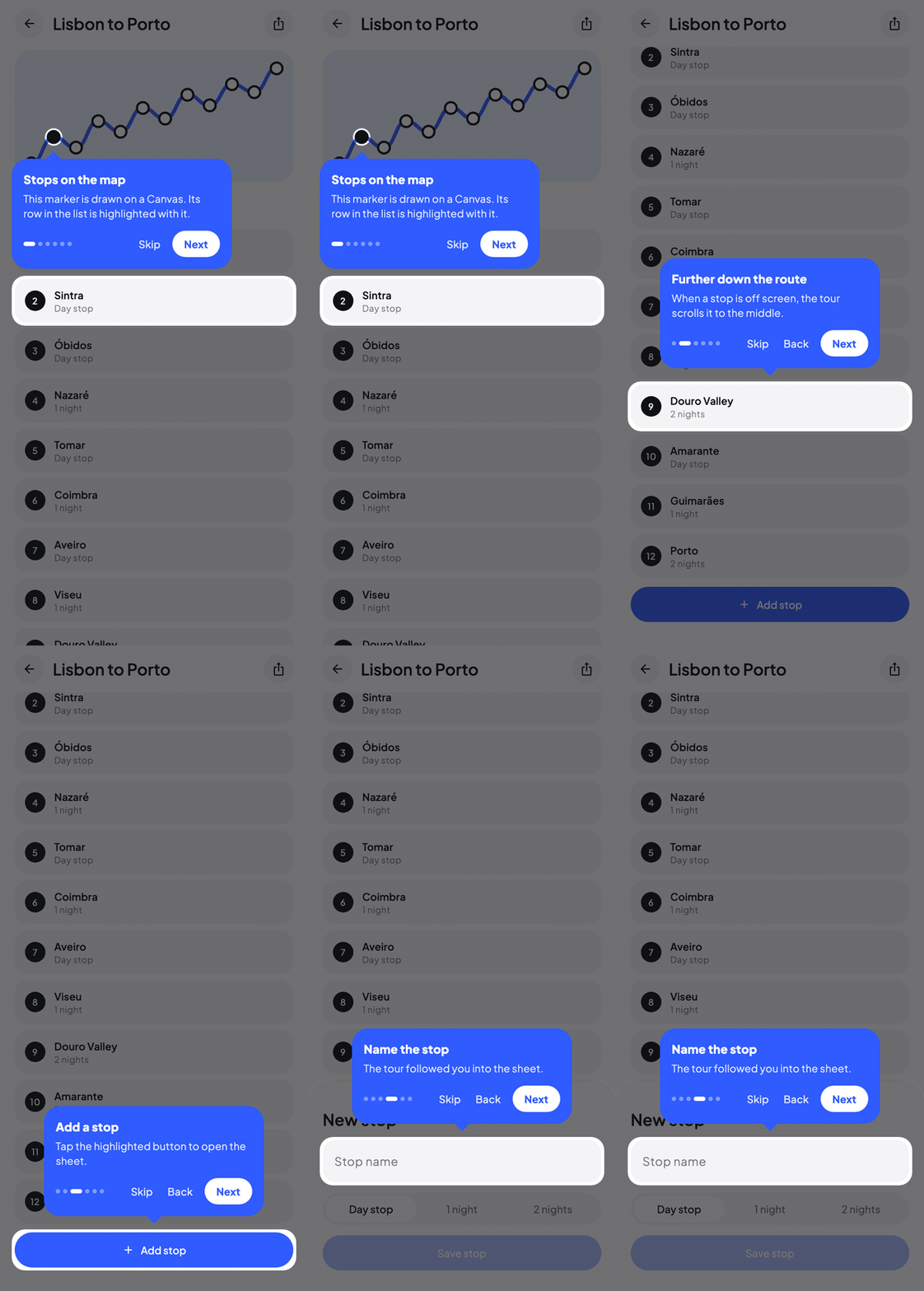
The problem
WaypointMaterial3Host(state = state) {
    MyScreen() // Primary targets register here.

    if (showDialog) {
        Dialog(onDismissRequest = { showDialog = false }) {
            // Targets in here are invisible to the outer host.
            DialogContent()
        }
    }
}
A Dialog is laid out in its own layer, outside the host's layout tree. Modifier.waypointTarget inside the dialog cannot express its position in the outer host's coordinate space, so the target is ignored.
The solution
Place a WaypointOverlayHost inside the modal, passing the same WaypointState:
WaypointMaterial3Host(state = state) {
    MyScreen()

    if (showDialog) {
        Dialog(onDismissRequest = { showDialog = false }) {
            WaypointMaterial3OverlayHost(state = state) {
                DialogContent() // Targets register here.
            }
        }
    }
}
With the core module, use WaypointHost and WaypointOverlayHost and pass your tooltipContent to both.
Both hosts share state. Targets register against their nearest host. The overlay and tooltip render in the host that owns the current step's target.
API
@Composable
public fun <K> WaypointOverlayHost(
    state: WaypointState<K>,
    modifier: Modifier = Modifier,
    highlightStyle: HighlightStyle = WaypointDefaults.HighlightStyle,
    overlayClickBehavior: OverlayClickBehavior = WaypointDefaults.OverlayClickBehavior,
    tooltipSpacing: Dp = WaypointDefaults.TooltipSpacing,
    screenMargin: Dp = WaypointDefaults.ScreenMargin,
    tooltipContent: @Composable (StepScope) -> Unit,
    content: @Composable () -> Unit,
)
It accepts the same styling parameters as WaypointHost so each host can use a locally appropriate tooltip or highlight. The Material3 shortcut is WaypointMaterial3OverlayHost.
Architecture
Each host gets a unique id and registers its layout coordinates with the state. Targets inside a host resolve their nearest host via LocalWaypointHostId and register their bounds in that host's local space.
When the current step's target key resolves to host A, only host A renders the overlay and tooltip. Host B stays passive. A step without a target is always rendered by the primary host.
A step's additionalTargets must live in the same host as its primary target. Additional keys registered against a different host are ignored for that step's highlight.
Only the primary host (WaypointHost) runs these lifecycle effects:
beforeShowgating.advanceOn.- Keyboard handling.
onTourComplete/onTourCancelcallbacks.
Overlay hosts (WaypointOverlayHost) stay silent on lifecycle to avoid duplicating side effects. The primary host's onTourComplete / onTourCancel still fire for every way the tour ends, including tooltip buttons inside an overlay host, keyboard shortcuts, overlay clicks, advanceOn, and direct state.stop() calls.
Full example: tour that spans a dialog
enum class TourKeys { HomeButton, DialogField, DialogSubmit, Confirmation }

@Composable
fun CheckoutTour() {
    var showDialog by rememberSaveable { mutableStateOf(false) }

    val state = rememberWaypointState {
        step(TourKeys.HomeButton) {
            title = "Start checkout"
            description = "Tap here to review your cart"
        }
        step(TourKeys.DialogField) {
            title = "Enter your address"
            beforeShow { showDialog = true }
        }
        step(TourKeys.DialogSubmit) {
            title = "Confirm the order"
        }
        step(TourKeys.Confirmation) {
            title = "Success"
            onEnter { showDialog = false } // Close dialog when moving past it.
        }
    }

    WaypointMaterial3Host(state = state) {
        Column {
            Button(
                onClick = { showDialog = true },
                modifier = Modifier.waypointTarget(state, TourKeys.HomeButton),
            ) {
                Text("Open checkout")
            }

            ConfirmationBanner(
                modifier = Modifier.waypointTarget(state, TourKeys.Confirmation),
            )
        }

        if (showDialog) {
            Dialog(onDismissRequest = { showDialog = false }) {
                WaypointMaterial3OverlayHost(state = state) {
                    Column {
                        AddressField(
                            modifier = Modifier.waypointTarget(state, TourKeys.DialogField),
                        )
                        SubmitButton(
                            modifier = Modifier.waypointTarget(state, TourKeys.DialogSubmit),
                        )
                    }
                }
            }
        }
    }
}
Flow:
- Tour starts on
HomeButton, primary host renders overlay + tooltip. - User hits Next. Step moves to
DialogField.beforeShowsetsshowDialog = true. - Dialog mounts. Inside it,
WaypointMaterial3OverlayHostregisters.AddressFieldregisters against the overlay host. - Overlay host takes ownership, primary host goes quiet, overlay host renders the spotlight and tooltip.
- User advances to
DialogSubmit, still owned by the overlay host. - Next step is
Confirmationoutside the dialog,onEntercloses the dialog, overlay host unregisters, primary host takes ownership again.
Backwards navigation
For tours that can move backwards through the dialog boundary, use onEnter on the post-dialog step to re-close the dialog if the user navigates forward past it, and use beforeShow on the dialog step to re-open the dialog on the way back:
step(TourKeys.DialogField) {
    // Ensures dialog is open whether we arrive from Home or Confirmation.
    beforeShow { showDialog = true }
}
step(TourKeys.Confirmation) {
    onEnter { showDialog = false }
}
beforeShow runs on every entry to the step, forward or backward, so the dialog opens consistently.
Platform support
WaypointOverlayHost works wherever Compose Multiplatform's modal primitives do:
- Android,
Dialog,ModalBottomSheet,Popup. - iOS, Compose
DialogandPopup(iOS renders modals inside the same window, but the composition is still separate). - Desktop,
DialogandPopuprender as layers in the same window; the overlay host spans the dialog content. - Web (Wasm/JS), same composition-tree rules apply.
The shared WaypointState is safe across hosts on every platform; there's nothing platform-specific in the host resolution logic.
LocalWaypointHostId
LocalWaypointHostId is a composition local that each host provides. Modifier.waypointTarget reads it to decide which host to register against, which is why placing a WaypointOverlayHost inside a modal is sufficient: the targets inside automatically pick up the inner host. You only need to read it yourself when registering target bounds manually with the experimental WaypointState.setTargetBounds.
Tip
You can nest overlay hosts further (a popup inside a dialog, for example). Each host scopes its children, and the state layer tracks ownership per target.
Stacking multiple overlay hosts
A single tour can span any number of hosts. For example, a tour that opens a dialog, then a popup inside that dialog:
WaypointMaterial3Host(state = state) {
    Screen()

    if (showDialog) Dialog(onDismissRequest = { showDialog = false }) {
        WaypointMaterial3OverlayHost(state = state) {
            DialogContent()

            if (showPopup) Popup(onDismissRequest = { showPopup = false }) {
                WaypointMaterial3OverlayHost(state = state) {
                    PopupContent()
                }
            }
        }
    }
}
State handles all three hosts transparently.
See also
- Async Gates,
beforeShowis how you open the modal before the step tries to render. - WaypointState, the state holder both hosts share.